CD22 Withdraw – Everything You Need to Know
If you have been playing on CD22 and you have won some money, the next thing you want to do is withdraw it to your JazzCash or Easypaisa wallet. The CD22 withdraw process is simple, fast, and fully designed for Pakistani users. In this complete guide, we will walk you through every single step of the CD22 game withdraw process so you can get your money without any confusion or delay.
Many new users get confused about withdrawal because of the turnover requirement. Do not worry — we will explain that clearly too. By the end of this article, you will know exactly how to complete your CD22 app withdraw quickly and successfully.
What is CD22 Withdraw?
CD22 withdraw means taking your winning balance out of your CD22 game wallet and sending it directly to your JazzCash or Easypaisa mobile wallet. Once the withdrawal is processed, the money appears in your mobile wallet and you can use it for anything you want.
The CD22 apk withdraw system supports two e-wallet options — JazzCash E-Wallet and Easypaisa E-Wallet. Both are fast, reliable, and widely used across Pakistan. You do not need a bank account to withdraw. Your mobile wallet number is enough.

How to Do CD22 Game Withdraw – Step by Step
Follow these easy steps to complete your CD22 game withdraw without any problem:
Step 1 – Open the CD22 App Open the CD22 app on your Android or iOS phone. Make sure you are logged in to your account with your registered mobile number and password.
Step 2 – Tap the Withdraw Button On the home screen, you will see two big buttons — Deposit and Withdraw. Tap the Withdraw button to open the withdrawal page.
Step 3 – Choose Your Withdrawal Method On the withdrawal page, you will see two tabs at the top:
- JazzCash E-Wallet — Withdraw directly to your JazzCash mobile wallet
- Easypaisa E-Wallet — Withdraw directly to your Easypaisa mobile wallet
Select whichever wallet you want to use for your CD22 app withdraw.
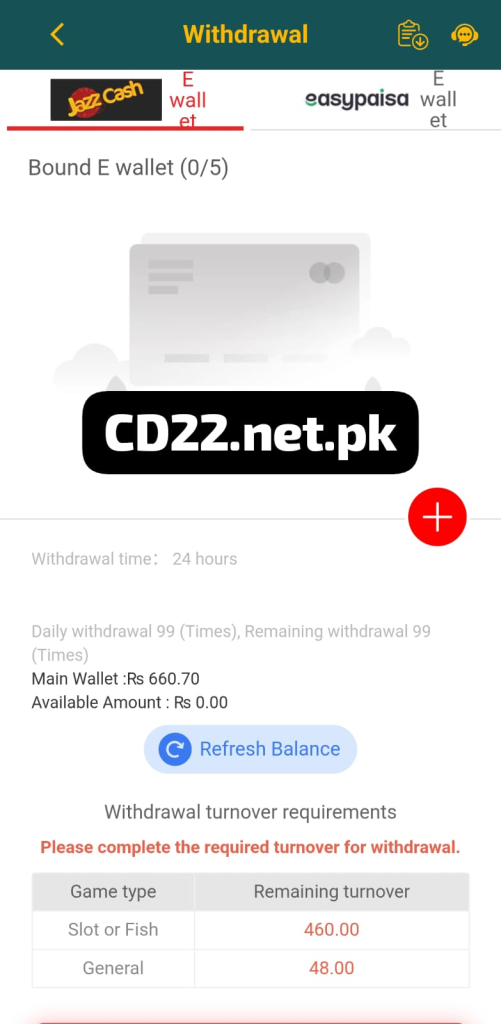
Step 4 – Add Your E-Wallet Number If you have not linked your wallet before, you will see a screen that says Bound E Wallet (0/5). This means you have not added any wallet yet. Tap the red plus (+) button on the screen to add your JazzCash or Easypaisa number.
You can add up to 5 different e-wallet numbers on one CD22 account. This is very helpful if you want to withdraw to different wallets.
Step 5 – Check Your Available Balance Before entering the withdrawal amount, check the information shown on your screen:
- Main Wallet — Your total balance in CD22
- Available Amount — The amount you can currently withdraw after completing turnover
- Daily Withdrawal Limit — You can make up to 99 withdrawal requests per day
Step 6 – Complete the Turnover Requirement This is the most important step. Before you can withdraw, CD22 requires you to complete a minimum turnover. You will see a table on the screen showing:
- Slot or Fish Games — Remaining turnover amount
- General Games — Remaining turnover amount
You must play Slot or Fish games until the remaining turnover reaches zero. Only then will your CD22 apk withdraw become available.
Step 7 – Enter Withdrawal Amount and Confirm Once your turnover is complete and you have an available balance, enter the amount you want to withdraw. Tap OK or Confirm to submit your request.
Step 8 – Wait for Processing CD22 processes all withdrawals within 24 hours. In most cases, the money arrives in your JazzCash or Easypaisa wallet much faster — often within a few hours.
Understanding CD22 Withdrawal Turnover Requirements
The turnover requirement is something every new user must understand before attempting a CD22 game withdraw. Here is a simple explanation:
When you deposit money and receive a bonus, CD22 requires you to play a certain amount before you can withdraw. This is called a turnover requirement. It is a standard practice on all gaming platforms worldwide.
On CD22, the turnover is divided into two categories:
Slot or Fish Games Turnover You must play Slot or Fish games and reach a certain total bet amount. For example, if your remaining Slot or Fish turnover shows 460.00, you need to place bets totaling Rs 460 in Slot or Fish games before withdrawing.
General Games Turnover This covers other game types on the platform. If your remaining General turnover shows 48.00, you need to bet Rs 48 in general games.
Once both numbers reach zero, your CD22 app withdraw will be fully unlocked and you can take out your money freely.
CD22 Withdraw Limits and Timing
Here is a quick summary of all withdrawal rules on CD22:
- Withdrawal Time: Within 24 hours of submitting your request
- Daily Withdrawal Requests: Up to 99 times per day
- Maximum E-Wallets Linked: 5 wallets per account
- Supported Wallets: JazzCash E-Wallet and Easypaisa E-Wallet
- Availability: 24 hours a day, 7 days a week
The CD22 apk withdraw system never closes. You can submit a withdrawal request at any time — day or night — and it will be processed within 24 hours.
How to Add Your JazzCash or Easypaisa Wallet on CD22
Before you can complete your first CD22 withdraw, you need to link your mobile wallet. Here is how to do it:
Go to the withdrawal page inside the CD22 app. Tap the plus (+) button next to the Bound E Wallet section. Enter your JazzCash or Easypaisa mobile number. Confirm and save the wallet. Your wallet is now linked and ready to receive withdrawals.
You can link up to 5 different wallets on your account. This is useful if you want the option to withdraw to different numbers depending on the situation.
Important Tips for a Smooth CD22 Game Withdraw
Keep these tips in mind every time you want to do a CD22 game withdraw:
- Always check your Available Amount before submitting a withdrawal. If it shows Rs 0.00, it means your turnover is not yet complete.
- Play Slot or Fish games to complete your turnover faster. These are the most common game types on CD22 and they count directly toward your withdrawal turnover.
- Make sure your linked JazzCash or Easypaisa number is active and correct. A wrong number means your money goes to someone else and cannot be recovered.
- Do not submit multiple withdrawal requests for the same amount. One request is enough — wait for it to be processed within 24 hours.
- If your withdrawal is delayed beyond 24 hours, contact CD22 customer support through the live chat button inside the app. The support team is available 24/7.
- Tap Refresh Balance on the withdrawal page to see your most updated wallet balance and available amount before withdrawing.
How Long Does CD22 Withdraw Take?
The CD22 app withdraw is processed within 24 hours of submitting your request. However, in most cases users receive their money much faster — often within 1 to 3 hours during regular times.
Withdrawals are processed 7 days a week including weekends and Pakistani public holidays. The platform never pauses its withdrawal system, which makes it one of the most reliable earning apps in Pakistan for fast cash-outs.
Is CD22 Withdraw Safe and Real?
Yes, the CD22 apk withdraw system is real and safe. Thousands of Pakistani users across cities like Lahore, Karachi, Islamabad, Peshawar, and Faisalabad have successfully withdrawn money from CD22 to their JazzCash and Easypaisa wallets.
The platform uses JazzCash and Easypaisa — both of which are fully regulated and trusted payment systems in Pakistan. Your money is transferred through official mobile wallet channels, which means every transaction is secure and traceable.
Many users have shared screenshots of successful withdrawals ranging from Rs 500 all the way to Rs 15,000 and beyond. The key to a successful CD22 game withdraw is simply completing the required turnover before requesting your cash-out.
CD22 Withdraw – Frequently Asked Questions
Final Words on CD22 Withdraw
The CD22 withdraw system is one of the most straightforward and reliable withdrawal processes among all earning apps currently available in Pakistan. With support for JazzCash and Easypaisa, 24-hour processing, up to 99 daily withdrawal requests, and the ability to link 5 different wallets, CD22 makes it genuinely easy for Pakistani users to cash out their winnings.
The only thing you need to remember is to complete your turnover requirement before requesting a withdrawal. Play Slot or Fish games, finish the required turnover, and your money will be ready to withdraw within hours.
Whether you are doing your first CD22 apk withdraw or your hundredth, the process is always the same — fast, simple, and secure.